
Photo proof of delivery
Deliveroo Express includes a Photo Proof of Delivery (PPOD) feature that provides visual confirmation of completed deliveries. When an order is delivered without a direct handover, riders capture a photo showing where the order was placed. This feature enhances transparency for customers, reduces disputes, and supports greater accuracy and trust across the Deliveroo Express experience.
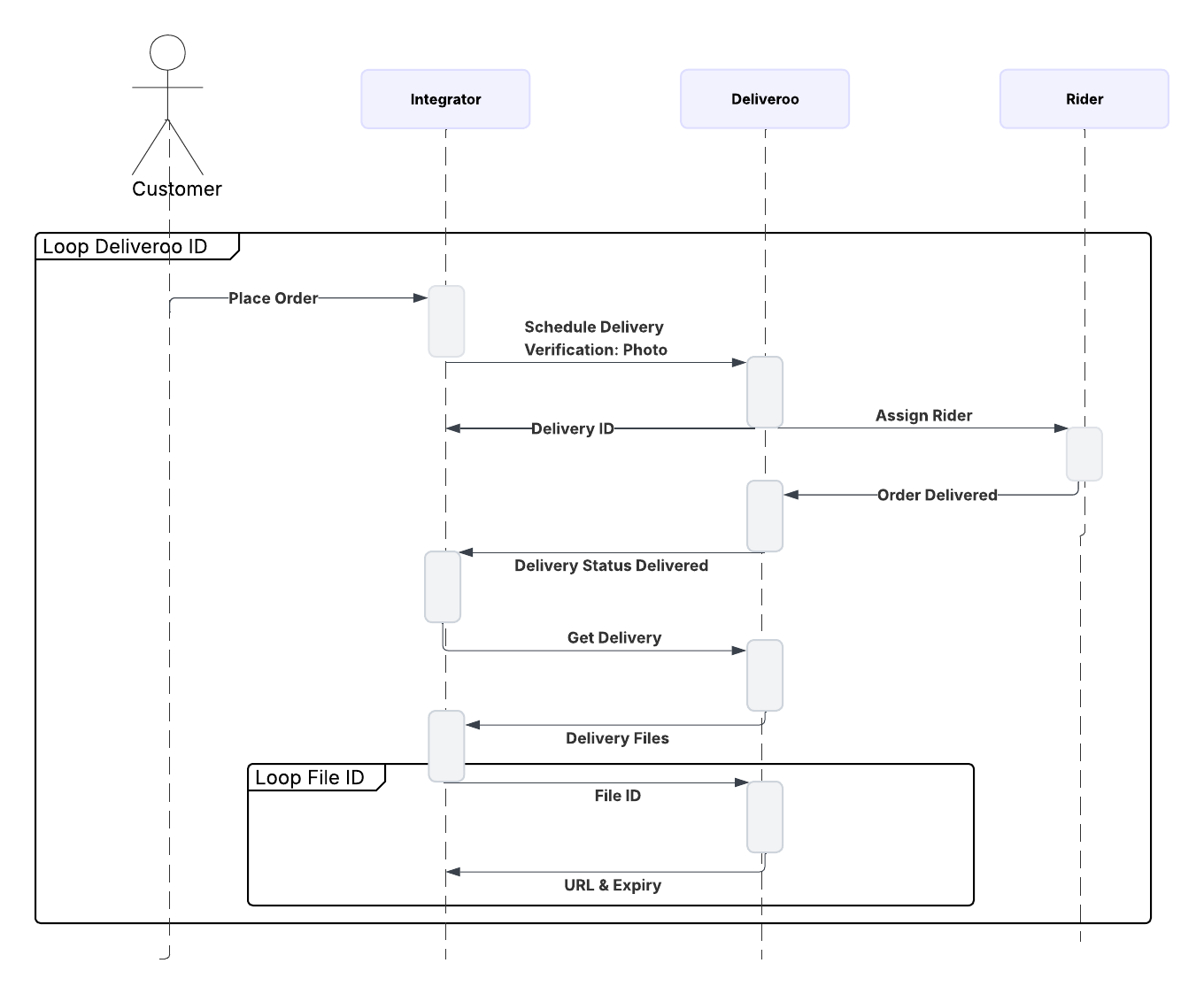
Steps for Integrators to Enable Photo Proof of Delivery (PPOD)
- Customer requests a delivery and specifies that a photo proof of delivery is required.
- Deliveroo assigns a rider
- Rider completes the delivery by taking a photo as proof.
- Deliveroo will send the delivery status - Delivered
- The partner can request the Get delivery linked to the Delivery ID. The file details will include the photo/file ID.
- Download and store the photo
- Use the signed URL to download the Get delivery photo.
- Save the photo securely in your own system before the URL expires.
Note
- A single order may have multiple file IDs when large orders require more than one rider. In such cases, each file ID must be called individually to retrieve its corresponding photo.
Example Payload JSONs
{
   "dropoff_details":
   {
      "notes": "Call me when you've arrived!",
      "phone_number": "+44XXXXXXX",
      "verification":
      {
         "type": "PHOTO"
      }
   }
}{
"event": "delivery.update_status",
"body":
{
"delivery_id": "e49db1e9-3cd4-4d1a-9e69-b0c9e3732c0a",
"external_ref_id": "Testing-XXX",
"status":
{
"effective_at": "2025-11-20T16:55:37Z",
"effective_at_nano": "2025-11-20T16:55:37.528Z",
"status": "DELIVERED"
},
"verification":
{
"type": "PHOTO",
"value": ""
}
}
}{
"delivery_files":
[
{
"file_id": "6f89053d-1228-4a70-8bf6-d7281ef60f86",
"rider_id": "e49db1e9-3cd4-4d1a-9e69-b0c9e3732c0a",
"type": "DELIVERY_PROOF"
},
{
"file_id": "1249000a-12a2-4b6d-a5a3-3613b14e7d0e",
"rider_id": "a7213f50-53fd-4606-a506-09afde8a8c8f",
"type": "DELIVERY_PROOF"
}
]
}{
"url": "https://uploads.deliveroo.com/view/XX_vUAD77-9Ux3vv71m77-977-977-9OAbvv70ZcO-_vSw=",
"expires_at": "2025-09-25T15:06:43.205Z"
}Updated 7 months ago
Did this page help you?