
Order Preparation State Management
Purpose
The only actions Deliveroo systems were recording so far during fulfilment are amendments (removals, substitutions, and partial fulfilment of quantity items). Everything else that happens during picking stays local to the partner: whether an item was scanned or manually picked, when it was fulfilled, or whether the picker had to backtrack.
Order preparation state management, or prep-state, establishes a persistent backend record of the key actions taken during fulfilment before an order is handed to the rider. At its core, it creates a structured, item-level source of truth that strengthens order accuracy, improves operational visibility, and reinforces accountability across the fulfilment journey. By capturing how each item was handled, including whether it was picked, substituted, removed, or scanned, prep-state enables more reliable performance reporting, clearer discrepancy analysis, and data-driven operational improvements.
Beyond immediate service protection, prep-state provides a scalable foundation for future capabilities. A consistent preparation state model allows Deliveroo and partners to evolve features over time, whether that is enhancing customer transparency, improving claim validation, or enabling smarter automation in the picking workflow.
How it works
Without prep-state
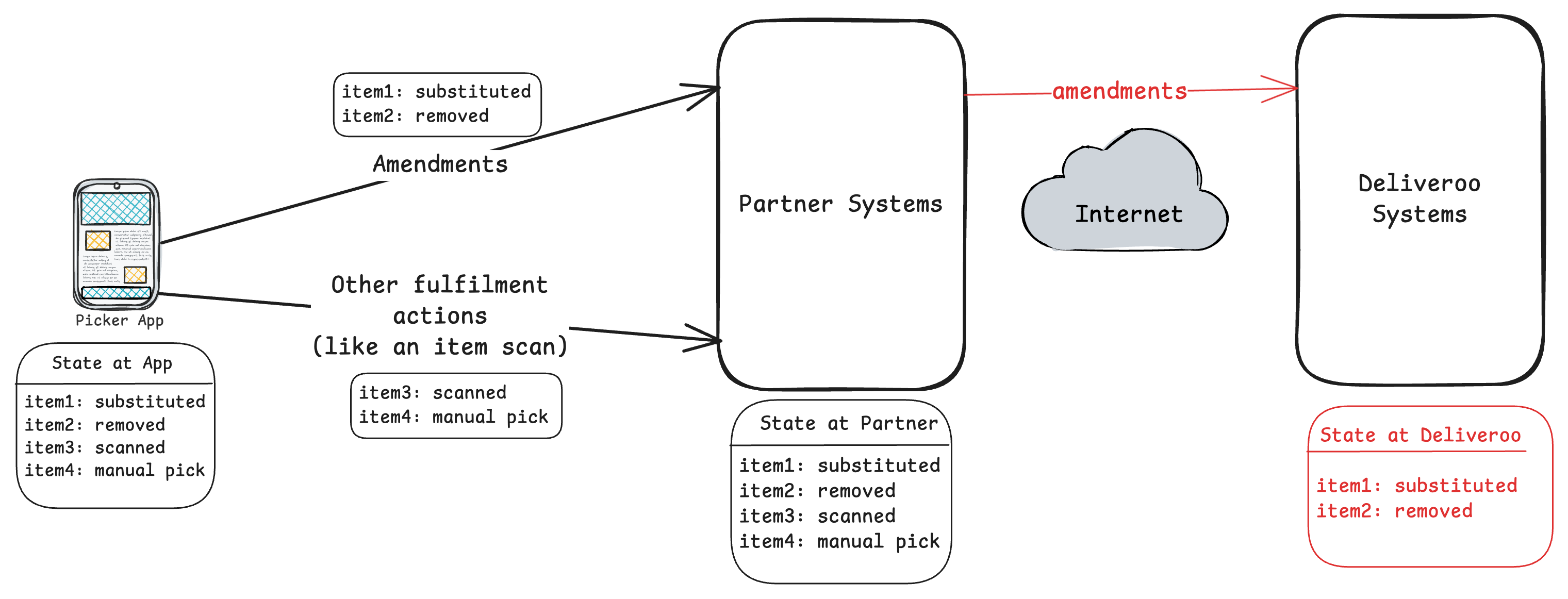
As depicted above, only amendments reach Deliveroo's systems. Actions like manual picks or barcode scans remain invisible.
With prep-state
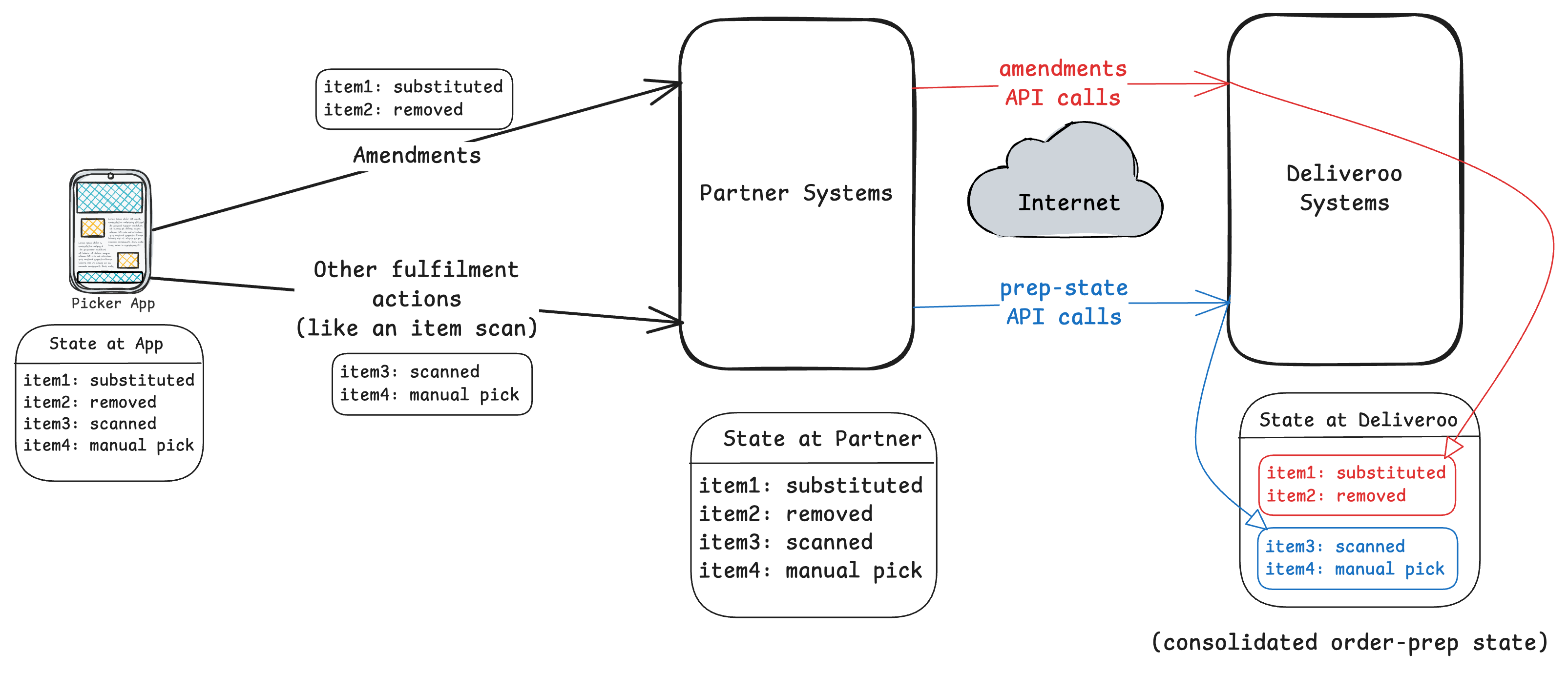
Amendments are not replaced by the prep-state APIs. They remain the source of truth for any changes that impact what the customer is charged which needs bookkeeping and approval in Deliveroo systems. Continue to use the existing amendment APIs for the cases below, and use the preparation state APIs introduced in this document to only record fulfilment progress (picked vs not picked) of the order items.
What counts as an amendment
An amendment is any action that changes the order contents compared to what was originally ordered, including:
- Removal of an item
- Quantity reduction / partial fulfilment (e.g., ordered 6, fulfilled 4)
- Substitution (replace one item with another)
- Variable-weight item adjustments (where applicable)
Required sequencing for order acceptance
If an order has amendments, you must submit all amendment updates before calling the order acceptance endpoint. We strongly recommend amendment updates are sent for each item as they occur instead of batching them at the end. Deliveroo systems treat order acceptance as the point where the final set of items is confirmed, accounting for any amendments that were made. If amendments are not submitted before order acceptance, the order may be treated as completely fulfilled (i.e., all items delivered to the customer as part of the basket).
How preparation state behaves when amendments exist
Preparation state is a progress-tracking signal. Amendments change the “shape” of the order. Because of that:
- If an item is amended (removed or substituted or its total quantity reduced), it is no longer be valid to update prep-state for the original item.
In practice this means:
- Continue sending prep-state updates while the picker is working.
- When the picker needs to remove/substitute/partially fulfil an item, call the amendment API as before.
- After the amendment is applied, use prep-state updates only for the items that aren’t amended (as amendment states are fed back into the preparation state automatically in the Deliveroo systems).
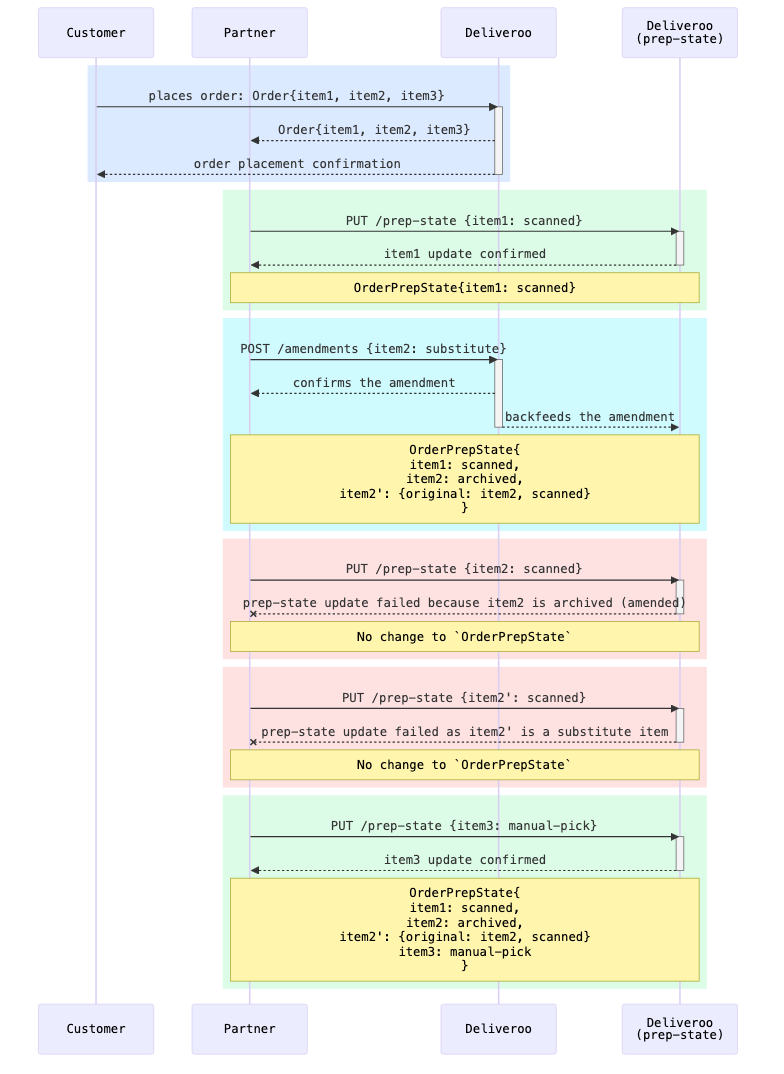
Let's look at how this work through an example. For the sake of clarity, the prep-state system within Deliveroo is depicted separately.
-
A customer places an order containing three items (
item1,item2,item3). Deliveroo notifies the partner with the full order details and confirms placement to the customer. -
As items are picked, the partner reports progress by calling
PUT /prep-statewith the item's new status. Whenitem1is scanned, Deliveroo's prep-state service confirms the update and the order prep-state is updated accordingly. -
If an item needs to be substituted, the partner calls existing amendment APIs. Deliveroo confirms the amendment and automatically backfeeds it into prep-state. The original
item2is marked asarchivedand a substitute entryitem2'is created, retaining a reference to the original item. Archived items can no longer be updated via prep-state. -
If the partner attempts to call
PUT /prep-stateon an item that has been archived due to an amendment, the request will be rejected. The prep-state service returns a failure indicating the item is archived and no state change occurs. -
Substitute items (
item2') are also not directly updatable viaPUT /prep-state. If the partner attempts to update the substitute item directly, the request will be rejected. Prep-state for substitute items is managed automatically by Deliveroo when the amendment is backfed. -
Items unaffected by amendments continue to be updated normally. When
item3is manually picked, the partner callsPUT /prep-stateand the update is confirmed, completing the prep-state for all active items in the order.
Guidance and best practices
Treat amendments as authoritative
If your system has already marked an item as picked and later you apply an amendment affecting that item, you should update the state at your end to reflect the amended order and stop sending prep-state updates for the original and the replaced item.
Refresh state after an amendment
After applying an amendment, you should fetch the latest preparation state for the order:
GET /picking/v1/orders/{order_id}/prep-state
This ensures your client is working from the latest item set. Bear in mind that prep-state and amendments are eventually consistent — if a recent amendment isn't reflected yet, retry after a short delay.
What should be done if the prep-state doesn't reflect the amendment updates?As shown in the diagram, amendments are automatically backfed into prep-state to keep them in sync. In rare cases, there may be a temporary delay before prep-state reflects the latest amendment data. If this occurs, do not block order fulfilment. The authoritative source for amendment data remains the existing webhooks and
GET .../ordersresponses — continue to treat these as the source of truth for order fulfilment decisions.
Be prepared for conflicts when updating amended items
If you attempt to update prep-state for an item that has been amended (for example, removed/substituted), the API may reject the update with a conflict-style error (for example, an “archived/amended item cannot be updated” type of response).
When that happens:
- Treat it as non-retryable
- Refresh the order prep-state (
GET .../prep-state) - Continue picking and send prep-state updates only for the non-archived and non-amended items
Do not rely on message timing
Network delays can happen. Your implementation should not assume that “prep state update” and “amendment update” will always arrive in strict time order. The safe approach is:
- Apply amendments using amendment APIs as soon as the picker confirms them
- Use
GET .../prep-stateas the reconciliation mechanism whenever there is ambiguity
Recommended integration flow
A typical partner flow should look like this:
- Start picking and send prep-state updates per item as items are picked/unpicked:
PUT /picking/v1/orders/{order_id}/prep-state/items/{item_id}
- If the picker needs to remove/substitute/partially fulfil an item:
- Call the existing amendment API (removal/substitution/partial fulfilment)
- Refresh state:
GET /picking/v1/orders/{order_id}/prep-state- Retry if you don't see the amendments propagated into the prep-state (these systems are eventually consistent) and don't block the order fulfilment if there's a temporary delay in the prep-state reflecting the amendment changes
- Continue prep-state updates only for the non-archived and non-amended items
- Once picking is complete and all amendments are submitted:
- Call Accept
This keeps preparation state and amendments eventually consistent, and ensures Deliveroo systems reflect the correct final outcome of the order.
Order preparation state APIs
Types
PrepState (enum)
PrepState (enum)Allowed values
PREP_STATE_FULFILLEDPREP_STATE_UNFULFILLED
PrepMethod (enum)
PrepMethod (enum)Allowed values
PREP_METHOD_SCANPREP_METHOD_MANUAL
AmendmentType (enum)
AmendmentType (enum)Allowed values
AMENDMENT_TYPE_SUBSTITUTEDAMENDMENT_TYPE_REMOVEDAMENDMENT_TYPE_PARTIALLY_FULFILLED
Get the entire order's preparation state
Request
GET /picking/v1/orders/{order_id}/prep-state
Path Parameters:
order_id(required) - Order identifier
Success response
200 OK
{
  "location_id": "string",
  "order_id": "string",
  "items": [
    {
      "item_id": "string",
      "prep_state": "<PrepState>",
      "amendment_type": "<AmendmentType>",
      "fulfilled_quantity": "integer",
      "original_quantity": "integer",
      "prep_method": "<PrepMethod>",
      "barcode": "string",
      "original_item_id": "string",
      "updated_at": "date-time-utc-iso-8601"
    }
  ]
}fulfilled_quantityandoriginal_quantitywill be the same whenprep_statefor an item isPREP_STATE_FULFILLEDfulfilled_quantitywill be0for items that have aprep-stateofPREP_STATE_UNFULFILLEDoriginal_item_idis only applicable for the items that are created as a result of an amendment
Error semantics
Response format (when applicable):
{
  "error": {
    "code": "ORDER_NOT_FOUND",
    "message": "<details on the error>",
    "retryable": false
  }
}
404 Not Found (non-retryable)
ORDER_NOT_FOUND
429 / 5xx (retryable)
RATE_LIMITEDINTERNAL,DEPENDENCY_FAILURE,TIMEOUT
GET a single item's preparation state
Request
GET /picking/v1/orders/{order_id}/prep-state/items/{item_id}
Path Parameters:
order_id(required) - Order identifieritem_id(required) - Item identifier
Success response
200 OK
{
  "location_id": "string",
  "order_id": "string",
  "item": {
    "item_id": "string",
    "prep_state": "<PrepState>",
    "amendment_type": "<AmendmentType>",
    "fulfilled_quantity": "integer",
    "original_quantity": "integer",
    "prep_method": "<PrepMethod>",
    "barcode": "string",
    "original_item_id": "string",
    "updated_at": "date-time-utc-iso-8601"
  }
}
Error semantics
- 404 Not Found if the order or item does not exist, or pick state isn’t initialised
- 403 Forbidden if not authorised
- 429 Too Many Requests if rate limited
- 5xx Server Error (retryable) if failure is due to timeout or an internal error
Add or update a single item's preparation state
Request
PUT /picking/v1/orders/{order_id}/prep-state/items/{item_id}
Path Parameters:
order_id(string, required) - Order identifieritem_id(string, required) - Item identifier
Request Body:
{
  "prep_state": "PREP_STATE_FULFILLED",
  "prep_method": "PREP_METHOD_SCAN",
  "barcode": "string"
}
Rules:
-
barcodeis required whenprep_method=PREP_METHOD_SCAN. It is also accepted (optional) whenprep_method=PREP_METHOD_MANUAL, for cases where the picker manually types or enters a barcode rather than scanning it. -
When
prep_state=PREP_STATE_FULFILLED, server sets:fulfilled_quantity = original_quantity
-
When
prep_state = PREP_STATE_UNFULFILLED, the server always does the following, regardless of any other attributes you send in the request:fulfilled_quantity = 0prep_method = PREP_METHOD_UNKNOWN, andbarcode=null- and clears all other attributes of the item to their null-values
Any additional attributes included in the request body (for example, a
barcode) are ignored and overwritten by these rules.
Success response
200 OK
{
  "location_id": "string",
  "order_id": "string",
  "item": {
    "item_id": "string",
    "prep_state": "<PrepState>",
    "amendment_type": "<AmendmentType>",
    "fulfilled_quantity": "integer",
    "original_quantity": "integer",
    "prep_method": "<PrepMethod>",
    "barcode": "string",
    "updated_at": "date-time-utc-iso-8601"
  }
}
Error semantics
400 Bad Request (non-retryable)
Use when the request shape is invalid.
Examples:
- unknown enum
barcodemissing andprepMethod = SCAN
404 Not Found (non-retryable)
ORDER_NOT_FOUNDITEM_NOT_FOUND
409 Conflict (non-retryable)
ARCHIVED_ITEM– item archived due to amendments, cannot set the prep state for amended itemsAMENDMENT_GUARD_VIOLATION– item currently substituted/removed/variable-weight-amended
422 Unprocessable Content (non-retryable)
ORDER_NOT_PICKABLE– order cancelled/completed etc.
Example:
{
  "error": {
    "code": "ARCHIVED_ITEM",
    "message": "order item is archived and cannot be updated"
  }
}
429 / 5xx (retryable)
RATE_LIMITED(includeRetry-After)INTERNAL,DEPENDENCY_FAILURE,TIMEOUT
Common implementation questions
Are these APIs synchronous? Will they slow down the picker flow?
No. These APIs are designed to be called asynchronously. Your client should not block the picker journey on these calls. Track actions locally and sync to Deliveroo in the background, accounting for rate limits and transient failures.
Which calls must remain synchronous?
The existing amendment APIs (substitutions, removals, partial removals/quantity reductions, and any variable-weight adjustments) must remain synchronous, because they can have pricing and other critical implications.
What is the difference between prep-state and Accept?
- Prep-state captures progress at item level (fulfilled vs not fulfilled, and how it was fulfilled).
- Accept indicates the order is ready to move forward operationally. Deliveroo systems typically assume the order is fully fulfilled at Accept, except where amendments exist.
Do I need to send the prep-state update for every item?
You should aim to, because it improves downstream capabilities (customer tracking, completeness validation, auto-completion handling). However, prep-state is treated as an optional signal today for the order fulfilment, so your flow should be resilient if some updates fail and need retrying later.
If I call PUT multiple times for the same item, what happens?
Updates are last write wins. Your client can safely resend an update when retrying, but you should still avoid excessive retries that could trip rate limits.
Can I partially fulfil an item via prep-state (e.g., set picked quantity = 4 of 6)?
Not with the prep-state APIs. Prep-state is a simple fulfilled/unfulfilled signal for the item’s current quantity. If you need to reduce quantity, do a partial fulfilment via the amendment APIs, then use prep-state to track progress on the updated item set.
When should I use GET whole order vs GET single item?
- Use whole order (
GET /picking/v1/orders/{order_id}/prep-state) when you need to rebuild state after reconnect/app restart, reconcile after an amendment, or validate completeness across the order. - Use single item
GETwhen you are updating a single UI element or debugging a specific item.
What is prep_method and when should I send a barcode?
- Use
PREP_METHOD_SCANwhen the picker scanned a barcode, and includebarcode. - Use
PREP_METHOD_MANUALfor non-scan picks (and do not sendbarcode).
If you send a barcode when not using scan, the request will be rejected as invalid.
What happens if I set an item to PREP_STATE_FULFILLED or PREP_STATE_UNFULFILLED?
PREP_STATE_FULFILLEDmeans the item is treated as fully picked for its current quantity.PREP_STATE_UNFULFILLEDmeans “not picked”, and any scan and other fulfilment related metadata are cleared at the server.
What does “archived” mean on an item?
If an item is amended (for example removed or substituted or partially fulfilled), the original item may no longer be active. In that case it can appear as archived, and you should stop sending prep-state updates for both the archived and the new item created as a result of the amendment.
What should I do if I get rate limited (429)?
Back off and retry later. Respect Retry-After if provided. You should queue updates locally and retry with exponential backoff and jitter.
Which errors are retryable?
In general:
- 429 and 5xx errors are retryable (subject to backoff and rate limits).
- 4xx errors like invalid request shapes, unauthorised access, and conflicts are typically non-retryable and require a client-side fix or a state refresh.
What should I do if the order or item isn’t found (404)?
Treat it as non-retryable. It usually means the order/item is unknown, no longer available, or prep-state is not initialised for that context. If you believe it’s transient, fetch the whole order state once to confirm, but do not loop retries.
Can I “undo” a pick?
Yes. Send PREP_STATE_UNFULFILLED via the PUT endpoint to mark the item as not picked.
How does this help with crash recovery / state rebuild?
On app restart or after connectivity issues, you can fetch:GET /picking/v1/orders/{order_id}/prep-state
…and rebuild the picker UI from the last successfully synced item-level state rather than forcing pickers to redo work.
How does this relate to customer tracking updates (e.g., “4 of 6 packed”)?
Prep-state gives Deliveroo a consistent item-level view of progress, which can be used to drive more granular tracking experiences. You don’t need to do anything special beyond sending accurate prep-state updates as fulfilment progresses. However, this feature doesn’t exist currently on the Deliveroo order tracker yet.
Can I use the prep-state APIs instead of the amendment APIs?
No. Prep-state is for progress tracking (fulfilled vs not-fulfilled). If you are removing items, substituting items, partially fulfilling quantities, or handling variable-weight adjustments, you must use the existing amendment APIs. The APIs are designed this way primarily to maintain backwards compatibility both within the Deliveroo systems and at the partner end.
What if I already marked an item as picked, but then I need to substitute or remove it?
Submit the amendment via the amendment API, then refresh the latest state using: GET /picking/v1/orders/{order_id}/prep-state. After that, stop sending prep-state updates for both the original item and the new item created as a result of the amendment.
What happens if I send a prep-state update for an item that was amended?
Your update may be rejected or overridden by the amendment update asynchronously behind the scenes. Treat any errors related to this as non-retryable, refresh the order state with GET .../prep-state, and continue with the active non-amended items.
Do amendments have to be sent before Accept?
Yes. All amendments must be submitted before calling Accept / Acknowledge. Accept is treated as the point where the final picked set is confirmed, with amendments being the mechanism to record exceptions.
Do I need to worry about timing or ordering between my prep-state updates and amendment calls?
You should not rely on timing. Networks and async delivery can reorder or delay updates. The recommended approach is:
- submit amendments as soon as the picker confirms them
- use
GET .../prep-stateto reconcile whenever there’s any uncertainty - do not block order fulfilment if the amendment related changes aren't reflected in the prep-state due to any temporary delays
How do I know which items I should be updating after a substitution?
After a substitution, both the original item and the new item created as a result of the amendment may no longer be valid to update.
Updated 5 months ago